The reader for what AI gives you

Stop reading code soup.

One Clear Reader is for visual readers. AI made the file, now make sense of it. Type part of a filename and it opens as a clear page you can read and edit, without copying it into another app.

Download free for Mac Watch it turn code soup into a page ↓
Opens .md.txt.pdf.docx.epub.html.csv
Free version forever·Every feature for 30 days·No card, no account
local, private, made for the files you already have
~/Documents/ai/roadmap_v3.md
Open
ON THIS PAGE
Q4 Roadmap
Priorities
Milestones
Risks
## Q4 Roadmap ### Priorities Ship the **path-paste** flow, then name search. Reading profiles follow once the reader is stable. - Search by partial filename - Watch `/tmp/` for Claude output - Export to PDF
headings, bullets, bold. it finally looks like a page
Q4 Roadmap
Priorities
Ship the path-paste flow, then name search. Reading profiles follow once the reader is stable.
  • Search by partial filename
  • Watch /tmp/ for Claude output
  • Export to PDF
Channel mix, Q3
ChannelSpendCACTrend
Search$12,400$38↑ 14%
Social$8,900$61↓ 6%
Newsletter$2,100$19↑ 31%
VerdictShift 20% of social spend to newsletter before October.
Where the week went
40h
Hunting for files42%
Fixing formatting27%
Actually reading31%
Launch plan
Sep 1Sep 8Sep 15Sep 22Oct 1
BUILD Reader
done
Search
in progress
SHIP Beta
Launch
a confession, from the person who built this

I can’t read markdown.
There, I said it.

I’m a visual person. I love AI (mostly) and I need to make decisions quickly. But when it hands me a wall of asterisks and pound signs, my brain just… slides right off it.

Raw markdown looks like code soup to me. I need to see the headings. I need the table to be a table. And for a long time I was too embarrassed to admit that, because everyone around me seemed fine.

Then I lost a client presentation. Four minutes hunting for the file, pasting it into a Google Doc, then fixing the formatting by hand, while they watched. That was the day I stopped pretending and built the thing I needed.

Founder, One Clear Reader · visual thinker, recovering file-fumbler

Sound familiar?

Three moments anyone reading AI docs will recognise.

“Where did it even save this?”
Claude says /tmp/. Cursor says somewhere in Application Support. Five minutes in Finder, every time.
“Is this a table or a fence?”
Pipes and dashes are not a table. Your eyes know it, and they check out halfway across the row.
“I just need to change one line.”
Copy it into Notion, fix the date, copy it back, hope nothing broke. For one date.
who it's for

Machines write Markdown.
Humans read it.

One Clear Reader is for everyone on the reading end. If you use AI and you have eyes, you're in.

Vibe coders
You ship with Claude and Cursor. You shouldn’t need to read like a compiler.
Builders and founders
Specs, plans, launch docs. Read them like documents, not like source code.
Developers with taste
You can read raw Markdown. You’d just rather see colour, headings and a table that lines up.
Writers, PMs and researchers
AI drafts it in .md. You want to read it, mark it up and send it on.
Visual readers
If walls of symbols make your eyes slide off the page, this was built for you first.

not for: robots. they're fine with the asterisks.

the fun part

Watch it handle the worst of markdown

Pick a file you might get from AI, or paste your own. Left is the raw .md. Right is the same content in One Clear Reader.

RAW MARKDOWN
## Launch checklist - [x] Pricing page copy - [x] App icon at every size - [x] Notarize the build - [ ] Press kit screenshots - [ ] Schedule the launch post
IN ONE CLEAR READER
Sprint 14 status
ItemOwnerPointsState
Reading profilesMaya8shipped
Name only searchJo5in review
EPUB supportSam13blocked
Publish flow
Draft in Claude
▼
Read in One Clear Reader
▼
Approve
Send back
Project status
✓ Research
→
✓ Design
▼
Build · in progress
▼
Test
Blocked: legal review
DoneActiveBlocked
Launch checklist
3 of 5 done
✓Pricing page copy
✓App icon at every size
✓Notarize the build
Press kit screenshots
Schedule the launch post
Watch a folder
swiftCopy
let watcher = FolderWatcher(
  path: "/tmp",
  types: ["md", "txt"]
)
// re-renders the open tab in place
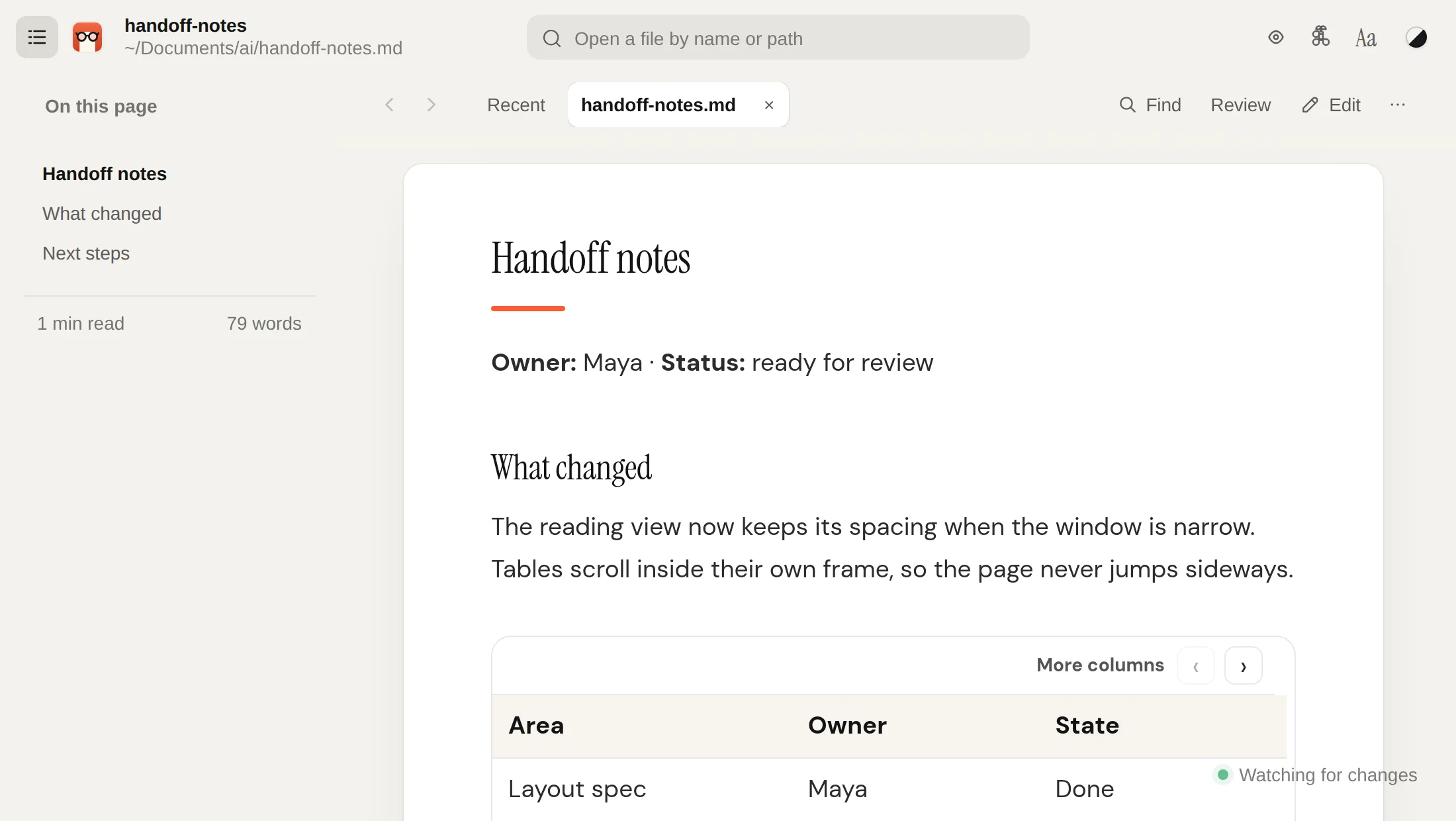
Handoff notes
Final spacing is set in the layout spec, and the token names live in the design system.
The One Clear Reader reading view
Figure 1. The reading view at default spacing.
Quiet Launch Playbook
Maya Chen · 11 August 2026 · 7 min read
marketinglaunchdraft
Week one is the landing page. Week two is validation. Nothing ships before the reading view feels right.
those [x] brackets become a progress bar

Every one of these is a real file on your Mac, rendered locally, still a .md you can hand back to AI.

MARKDOWN, PLUS THE EXTRAS YOUR AI USES
Mermaid diagrams, in color Task lists Callouts Tables Code highlighting Frontmatter
read it. tweak it. keep going.

Same file. Much easier to work with.

Open the plan AI just made. See the headings, read the table as a table, and find the part you want to change. Make your edit in One Clear Reader and keep working with the original .md file.

~/Projects/app/APP-PLAN.md
Read Edit
3 MATCHES FOR “app-pl”
MD
APP-PLAN.md
~/Projects/app/
2 min ago
TXT
app-plan-notes.txt
~/Documents/Claude/
Sep 20
PDF
app-plan-v1.pdf
~/Downloads/
Sep 2
App plan
Milestones
MilestoneOwnerDue
ReaderMayaSep 14
SearchJoSep 24
BetaJoOct 1
Beta opens to the waitlist first. Launch follows once search is stable.
# App plan
## Milestones
| milestone | owner | due |
|-----------|-------|--------|
| Reader | Maya | Sep 14 |
| Search | Jo | Sep 24 |
| Beta | Jo | Oct 8 |
App plan
Milestones
MilestoneOwnerDue
ReaderMayaSep 14
SearchJoSep 24
BetaJoOct 8
preview updates as you type
✓Saved to ~/Projects/app/APP-PLAN.md
When AI edits that file, your page refreshes too. the plan, actually readable
remember half a filename?

Type “marketing”. Pick the one you meant.

Every match on your Mac, newest first, full path shown. Or paste the path.

marketing 6 matches
MD
marketing-plan-q4.md
~/Documents/Claude/launch/
Today
MD
email-marketing-sequence.md
/tmp/claude_output_7f3a/
Today
MD
marketing-site-copy-v3.md
~/Projects/site/content/
Sep 19
MD
content-marketing-calendar.md
~/Documents/Cursor/notes/
Sep 12
DOCX
product-marketing-brief.docx
~/Downloads/
Sep 4
PDF
marketing-budget-2026.pdf
~/Documents/Finance/
Aug 28
Heading navigationFindQuiet modeReading profilesSearch inside filesSave as WordSpreadsheets as tablesSave PDFEdit the original fileLive refresh when AI edits
your eyes, your rules

Every heading, styled the way you read.

Pick a reading profile and a look. Large Print, Compact, Neuro-friendly and Paragraph Focus are free. Build your own with Pro.

MAKE THE PAGE FIT YOU
Reading profile

The standard page: lighter headings and generous spacing.

Colours
One accent

Every theme colours the title, headings, bullets and links for you. Pro has the full collection, lets you change any part, and saves your own themes.

LIVE PREVIEW · launch-plan.md
Q4 launch plan

Owner: Maya · Status: draft

Priorities

Ship name search first, then reading profiles. Keep the reader fast on big files, and check the launch notes before Friday.

  • Search by part of a file name
  • Readable tables with status colours
  • Profiles people can name and share
Risks

Notarising can take a day. Book it early, and keep a build ready for review.

try a preset. the full panel is in the app.
Not just markdown.
Whatever AI hands you, it opens as a clear page, with search and heading navigation.
.md.txt.pdf.docx.epub.html.csv
100% local
Your docs never leave your Mac. We can’t read them, because we never see them.
No account
Download, open a path, read. Nothing to sign up for.
Made for AI output
Paste the path Claude or Cursor gives you. Handles ~/ and /tmp/.
Native Mac
Opens instantly, stays light, and feels like part of your Mac.
the honest part about money

Start with everything.
Decide in 30 days.

Every feature is free for 30 days, no card. After that, reading and search stay free forever.

Free
$0forever
Everything for 30 days, then the essentials stay yours.
✓Paste a path, skip Finder
✓Find any file by part of its name, or in Latest from your AI
✓Tables, diagrams and code, formatted
✓Large Print, Neuro-friendly and Paragraph Focus
✓Opens Markdown, PDF, Word, EPUB, web pages and CSV
Download free for Mac
Pro
$1.67/month
Billed $19.99 a year. That’s 58% less than monthly.
✓Everything in Free, plus:
✓The full theme collection. Adjust every colour, save your own
✓Unlimited review notes, sent back to your AI
✓Export to PDF, formatting kept
✓Save as Word, and edit Word files
✓See what changed since you last opened a file
Go Pro yearly
launch only
Founder Lifetime
$29$59once
Pay once, own it forever. Goes to $59 after launch.
✓Everything in Pro, forever
✓Every future feature. No upgrade fees
✓Use it on up to 3 of your Macs
Claim a founder license
less than two years of Pro. yours for good.
✓30-day money-back guarantee ✓No card for the trial ✓Cancel Pro anytime ✓Your files never leave your Mac

Frequently asked questions

(the ones we all ask!)

Open and find your files

How do I open a .md file on a Mac and read it like a document?

A .md file is a Markdown document: plain text with symbols that mark headings, lists, links and other formatting. Open it in One Clear Reader and you see the formatted page instead of the symbols. The file stays a .md file on your Mac.

How can I read Markdown from Claude or Cursor without all the # and * symbols?

Open the .md file they created in One Clear Reader. Headings look like headings, lists look like lists, and tables line up. You read the document without converting it to another file type.

Can I paste the file path an AI tool gave me?

Yes, if the path points to a file on your Mac. Paste it into the search bar, including paths that start with ~/ or /tmp/, and the file opens.

If a browser chat gives you a path like /mnt/data/report.md, the file is still in the AI service’s workspace. Download it first, then open the downloaded copy.

How do I find an AI document if I only remember part of its name?

Type the part you remember into the search bar. Searching “launch” finds launch-plan.md without knowing its full name or opening folders one by one. It also finds words inside your documents, so you can search for something the file says.

Where did my AI save the file?

Look under Latest from your AI on the welcome screen. It lists the Markdown, Word, text and web files that changed on your Mac in the last day, newest first.

It also checks the places AI tools often use that normal search skips, like the temporary folder and Claude Code’s plans folder. Click a card and the file opens.

I have more than 1,000 AI-generated documents. Will search still work?

Yes. Search uses your Mac’s own Spotlight index, so results come back straight away across your home folder and iCloud Drive. The best test is your own files: every feature is free for 30 days.

Read and work with the document

What file types does One Clear Reader open?

Markdown (.md and .markdown), plain text (.txt), PDF, Word (.docx), EPUB, web pages (.html) and spreadsheet files (.csv and .tsv).

Markdown and text get the full reading and editing experience. Word files can be edited too, on the Pro plan. The other types open for reading.

Will it display tables, images, code blocks and Mermaid diagrams?

Yes. Tables are laid out as grids, code blocks are highlighted, and Mermaid code is drawn as a diagram, colours included.

Images linked from a Markdown file show when the image is on your Mac at the path the document points to.

What happens to my original file when I open or edit it?

Opening a file to read it doesn’t change it. When you edit, your changes are saved to the same .md file, so your AI tool can keep working with it. A copy of every earlier version is kept on your Mac, so you can go back.

If the file changes outside the app, the page refreshes to show the latest version.

Can I customise how documents look?

Yes. Pick a reading profile: Default, Large Print, Compact, Neuro-friendly or Paragraph Focus. Then pick a theme, like Paper, Mist or Night, and one accent colour. All of these are free.

Every theme has its own colours for the title, headings, bullets, links and quotes. With Pro you get the full collection of 22 themes, light and dark, and can change any part, save it as your own theme, and build your own text profile. None of this changes the file underneath.

Can I print or share a readable version?

Yes. Pro saves a formatted PDF, or a Word file, so someone else gets a readable copy while you keep the original Markdown for more work.

Check tables, images and diagrams in the saved copy before you send an important document.

Can I share my notes on a document with someone?

Yes. In Review, choose Save as file. Your notes are saved as a readable file next to the document, like plan.notes.md.

When someone opens the document in One Clear Reader, it offers to show your notes on their page. Anyone without the app can still read the notes file as plain text.

Privacy and choosing a plan

Are my documents private? Who else can access them?

Yes, they stay private. One Clear Reader reads files on your Mac. It doesn’t upload their contents or need an account.

Anyone else’s access still depends on where you store the file and which backup or sync services you use. Opening a file here doesn’t make it public.

Why use One Clear Reader if I already have VS Code, Notion or Obsidian?

Use the tool that fits the job. VS Code is great when you’re already editing a project. Obsidian is great for a connected collection of notes. Notion is great for shared workspaces.

One Clear Reader is for the moment in between: finding the file your AI just made, reading it comfortably, and editing the same file when you need to.

What is the difference between the free and paid plans?

Free keeps reading, paste-a-path, file search and the reading profiles, forever. Every feature is free for 30 days, no card needed.

Pro adds the full theme collection, your own themes and profiles, Quiet mode, the heading sidebar, formatted PDF and Word export, and editing Word files, for $3.99 a month or $19.99 a year. At launch only, a Founder Lifetime licence is $29 once for the first 500 buyers, then $59.

Is there a guide?

Yes. The app has a 30-second tour on a sample page: choose Take the tour on the welcome screen, or Help > Take the 30-Second Tour.

Step-by-step guides are at oneclearreader.com/guides.

How do updates work?

Once a day, the app checks oneclearreader.com for a newer version. If there is one, a small note offers the download. The check sends nothing about you or your files.

You can turn the daily check off with ⌘K, or check any time from the app menu.

Back to the thing you were making.

Paste one AI file path. If it doesn’t feel like relief, delete it. No account, nothing to cancel.

Download free for Mac
macOS 13+30 days free, all featuresNo card, no account